Games Are the Best Test of What AI Can Actually Build
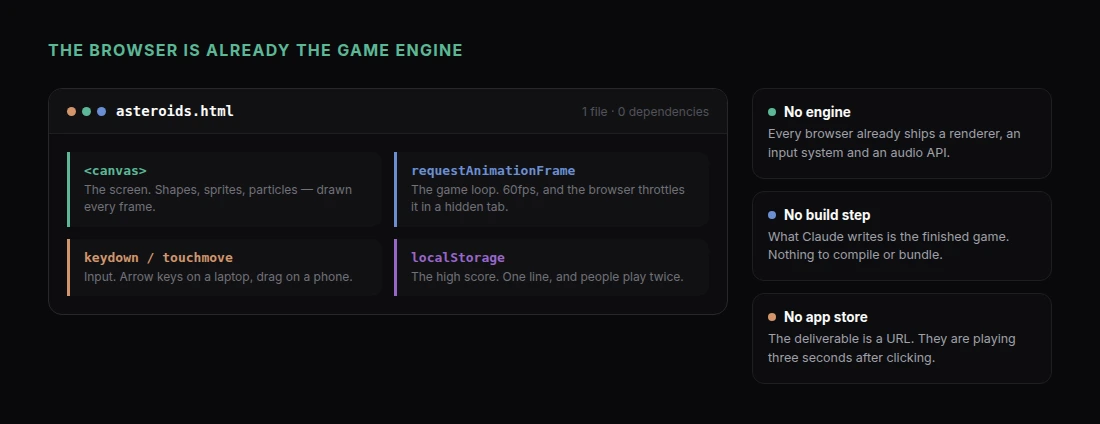
A report can be wrong and still look finished. A game cannot. Either the collision detection works or your character walks through walls. Either the score updates or it does not. Games fail loudly, which makes them a genuinely good way to find out what an AI model can build.
Claude is unusually well suited to it, for a specific reason: the browser is already a game engine. It has a canvas, a render loop, keyboard and touch input, and audio, all built in. So a complete game can be one HTML file with no engine, no build step, no install, and no app store.
Which means the finished thing is a URL. You send someone a link and they are playing three seconds later.
This guide covers three kinds of game that work well in a single file, the prompt details that decide whether the result is fun or broken, and how to debug a game you did not write.
Start Smaller Than You Think
The most common failure is scope. "Build me a roguelike" produces something that half-works in ten directions. A tight, well-specified small game comes out genuinely playable on the first try.
Good first projects share three traits: one core mechanic, one screen, and a clear win or lose condition.
Game 1: An Arcade Game with a Score
This is the sweet spot for a first build.
"Build a complete browser game in a single HTML file. It is a top-down asteroid-dodging game. The player controls a small ship at the bottom of the screen with arrow keys (and touch drag on mobile). Asteroids fall from the top at increasing speed and frequency. Colliding with one ends the game. Score increases by 1 for every asteroid that passes safely. Include: a title screen with a Start button, a live score display, a game-over screen showing final score and a Play Again button, and a high score stored in the browser so it survives a reload. Use canvas rendering with a smooth 60fps game loop. Style it with a dark space background, simple geometric shapes, and a subtle particle effect when the ship is destroyed. Make the difficulty curve gentle for the first 20 seconds."
The details doing the work here:
A stated control scheme, including touch. Otherwise you get a keyboard-only game that is dead on a phone, and most links get opened on phones.
A difficulty curve. Without it, games are either trivially easy forever or unplayable after four seconds.
Local high score. One sentence, and it is the thing that makes people play twice.
Explicit screens. Title, play, game over. Games without a title screen start before the player is ready.
Game 2: A Puzzle Game with Real Rules
Puzzles need correct logic more than they need smooth animation, which plays to Claude's strengths.
"Build a complete 2048-style sliding puzzle in one HTML file. 4x4 grid, arrow keys and swipe gestures. Tiles slide and merge when equal, a new 2 or 4 appears in a random empty cell after each valid move, and the game ends when no moves are possible. Track score as the sum of all merges. Include an undo button that goes back one move, a New Game button, and a win state at 2048 that lets the player continue. Animate tile movement and merges. Use a warm color palette where each tile value has its own color."
Puzzle games are also the easiest to verify. Play ten moves and you will know whether the merge logic is right.
If you want something more original than a clone, describe the mechanic rather than naming a game:
"Build a word puzzle where the player is given 9 letters and has 90 seconds to make as many valid words of 4+ letters as possible, scoring by word length. Include a built-in word list of common English words — do not call an external API. Show found words as a list and reveal the three longest possible words at the end."
That "do not call an external API" instruction matters. A single-file game with no network calls keeps working forever; one that depends on a free API breaks the day that API changes.
Game 3: A Narrative or Quiz Game
No canvas, no physics — just state, choices, and consequences. These are the fastest to build and often the most shared.
"Build a branching narrative game in one HTML file. Theme: you are a junior engineer on your first on-call shift and the site has gone down. 12 decision points, each with 2-3 choices. Track three hidden stats: system stability, team trust, and your own stress. Choices adjust the stats, and the stats determine which of four endings you reach. Show the current situation as a short paragraph with the choices as buttons. Do not show the stats during play — reveal them on the ending screen with a short explanation of how each choice mattered. Terminal-inspired monospace design."
Hidden stats revealed at the end is the trick that makes these replayable.
The Instructions That Fix Most Problems
A handful of lines prevent the majority of issues:
"Keep everything in one HTML file with no external dependencies or CDN links. Make it work on both desktop and mobile. Pause the game loop when the browser tab is hidden. Prevent arrow keys from scrolling the page. Make sure the canvas scales to fit any screen size without distorting."
That tab-visibility one is worth knowing about. Browsers throttle background tabs, so a game that does not pause comes back either frozen or having fast-forwarded through everything.
Debugging a Game You Did Not Write
You will hit bugs. Describing them precisely is the entire skill.
Vague: "The game is broken."
Useful:
"When the ship touches the left edge of the screen it disappears entirely instead of stopping at the boundary. It should stop and stay visible."
"The score keeps counting up on the game-over screen. It should freeze at the final value."
"On my phone the ship jumps to wherever I tap instead of following my finger. It should move only while I am dragging."
State what happened, then what should have happened. Claude fixes these reliably when they are described that way, and usually not at all when they are not.
If something is deeply wrong, ask for the reasoning rather than the fix:
"Before changing anything, explain how the collision detection currently works and why it might trigger before the shapes visually overlap."
Why Sharing a Game as a Link Changes the Calculation
A game that lives on your laptop is a curiosity. A game at a URL is something you can put in front of people.
Ask Claude to share it and you get a link that opens straight into the game. No download warning, no install, no store review, no "which platform are you on?" It works the same for everyone you send it to.
That opens up uses that have nothing much to do with games:
- A conference booth demo — a themed arcade game with your branding and a leaderboard
- Onboarding or training — the narrative format above, with your incident runbook as the plot
- Recruiting — a small puzzle in a job posting
- A newsletter or launch — something genuinely fun is one of the few things people forward unprompted
That last one is worth taking seriously. Games are among the most linkable things you can publish, and links are the currency of getting found.
A Note on Expectations
Claude builds small games very well. One mechanic, one screen, clean rules — the results are legitimately fun and take minutes.
It does not build large games well, and neither does anything else that works by prompt. Multi-level progression, complex physics, asset pipelines, multiplayer netcode — those need a real project and a real engine. If your idea needs saved profiles and twenty levels, a single HTML file is the wrong container.
Build the small version first anyway. It is the fastest way to find out whether the mechanic is fun before anyone invests a month in it.
Get Started
For other things worth building in a single file, Claude Artifacts Examples has ten of them, and Build Interactive Calculators and Tools with Claude covers the more practical end of the same technique.
To build your first game:
- Add the Claude connector — one click, nothing to install
- Pick one mechanic and one screen
- Specify the controls, including touch
- Ask for a title screen, a game-over screen, and a stored high score
- Play it, then describe each bug as "this happened, that should have happened"
- Ask Claude to share it, and send the link to someone
Then watch whether they play it twice. That is the only review that matters.