A Quiz Nobody Can Take Is Not a Quiz
Most AI quiz generators stop one step early. They produce questions — sometimes very good ones — and then hand you a list, a Word document, or a locked-in widget on their platform. You still have to get the thing in front of people.
That last step is the whole point. A quiz only does its job when someone who is not you can open it, answer it, and see a result.
Claude closes that gap by building the quiz as a working page: questions, answer logic, scoring, a results screen, and the styling around it, all in one HTML file. Then you share it as a link and send that link to your list, your students, your candidates, or your prospects.
This guide covers the three kinds of quiz worth building, the scoring model each one needs, and the prompt details that separate a quiz people finish from one they abandon on question three.
First, Decide What the Quiz Is For
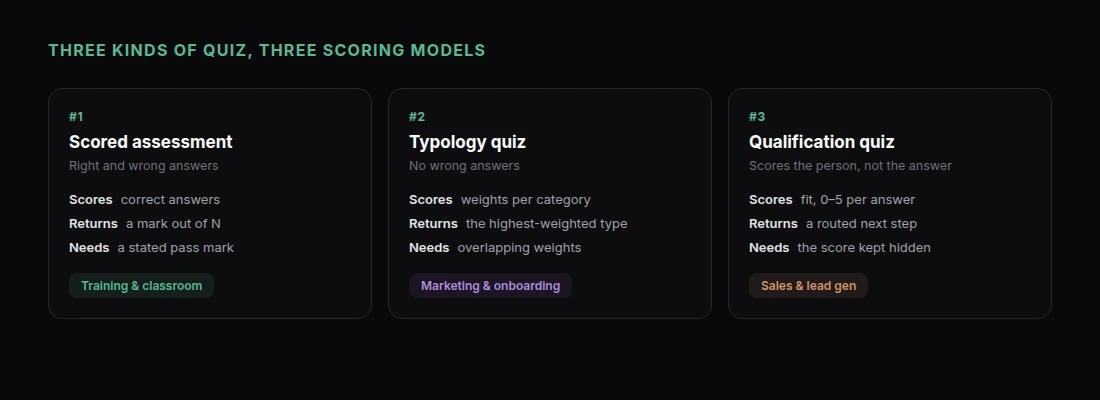
The three common types need genuinely different logic, and telling Claude which one you want up front saves a lot of back and forth.
Scored assessments have right and wrong answers. A score out of ten, a pass mark, maybe an explanation of what you got wrong. Training, certification, classroom use.
Typology quizzes have no wrong answers. Each option weights toward one of several outcomes, and the result is a category. "Which project management style fits your team?" Marketing, onboarding, self-discovery.
Qualification quizzes score the person rather than their knowledge. Answers map to a fit score, and the result routes them somewhere — a demo booking, a pricing tier, a resource. Sales and lead generation.
Pick one before you prompt. A quiz that tries to be two of these at once is confusing to take and impossible to score cleanly.
Building a Scored Assessment
This is the most common request and the easiest to get right.
"Build an interactive quiz that tests knowledge of GDPR basics for a marketing team. 12 multiple-choice questions, 4 options each, exactly one correct. Cover: what counts as personal data, lawful bases for processing, consent requirements for email marketing, data subject access requests, breach notification timelines, and transfers outside the EU. After each answer, immediately show whether it was right or wrong plus a one-sentence explanation of why. At the end show the score out of 12, a pass/fail against a 9/12 pass mark, and a list of the questions they got wrong with the correct answers. Add a progress bar. Include a 'Retake' button that reshuffles the question order."
The details that matter here:
Immediate feedback vs. end feedback. Say which you want. Immediate feedback is better for learning; end-only feedback is better if you are measuring something.
A stated pass mark. Without one you get a score and no verdict, and people do not know what to make of a 9.
Reshuffling on retake. Otherwise people just memorise the position of the right answer.
Question Quality Is a Separate Instruction
Claude writes competent questions by default and excellent ones if you tell it what "excellent" means here:
"Rewrite the distractors. Every wrong option should be something a reasonably informed person might actually believe — no obviously silly answers. Avoid 'all of the above'. Keep every option roughly the same length, because longer options read as correct."
That last point is a real testing artefact, and it is the kind of thing generated quizzes get wrong constantly.
If you are quizzing on your own material, paste it in and have Claude work from that rather than from general knowledge:
"Here is our internal security policy [paste]. Write 10 questions that test whether someone has actually read it. Every question must be answerable from this document alone."
Building a Typology Quiz
The scoring model is different: each answer adds weight to one or more categories, and the highest total wins.
"Build a quiz called 'What Kind of Note-Taker Are You?' with 8 questions, 4 options each. Four result types: The Archivist, The Minimalist, The Connector, The Firehose. Each answer weights toward one or two types — do not make it a simple one-to-one mapping, because that makes the result obvious to the person taking it. At the end, show the top result with a two-paragraph description written in second person, a percentage breakdown across all four types as horizontal bars, and one specific recommendation for each type. Card-based design, one question per screen, smooth transitions."
Two things make these work:
Overlapping weights. If option A always means type A, people can steer their own result and the quiz feels rigged.
A result worth screenshotting. The description is the product. Ask for it to be specific and slightly flattering — that is what gets shared.
"Make each result description feel personal and specific rather than horoscope-vague. Name a habit the person probably has and a mistake they probably make."
Building a Qualification Quiz
Here the score is about fit, and the result is a routing decision.
"Build a 6-question qualification quiz for a B2B analytics product. Questions should establish: company size, current tooling, who owns reporting today, how often they report, biggest current pain, and timeline. Score each answer 0-5 for fit. At the end, route into one of three outcomes based on total score: high fit shows a 'Book a demo' CTA with a calendar link, medium fit shows a link to our self-serve trial, low fit shows a link to our free reporting templates. Do not show the score itself to the person taking it — just the recommendation."
Hiding the score is deliberate. Nobody enjoys being told they are a low-fit lead.
Add capture at the right moment:
"Add a name and work email field on the results screen, before the recommendation is revealed. Keep it to two fields."
Asking after the last question but before the payoff converts substantially better than asking up front.
The Details That Decide Completion Rates
Show progress. A progress bar or "Question 3 of 8" is the single cheapest way to reduce abandonment.
One question per screen. A long scroll of questions reads as a form. A form reads as work.
Make it work on a phone. Most quiz links are opened on mobile.
"Make sure it works well on a phone — tap targets at least 44px, one question filling the screen, no horizontal scrolling."
Let people go back.
"Add a 'Previous' button so people can change an earlier answer without restarting."
Keep it short. Eight questions is comfortable. Twelve is the ceiling for anything voluntary.
Getting It in Front of People
Ask Claude to share it and you get a link. That link is the distribution.
Drop it in an email, a Slack channel, a LinkedIn post, or your course platform. It opens in a browser with no install and no account, which is exactly what you want when you are asking someone for two minutes of their attention.
Because the page is live at a URL rather than sitting in a file, you can fix a typo in question 4 and everyone who opens the link afterwards sees the fix. No re-sending.
One honest limitation: a self-contained quiz page scores in the browser and shows the result to the person taking it. It does not, on its own, send results back to you. If you need to collect responses, have Claude wire the results screen to something that does:
"On submit, POST the answers and score as JSON to this webhook URL: [your URL]. Show a confirmation message after it succeeds."
A form endpoint, a spreadsheet webhook, or your own API all work. For a knowledge check or a marketing quiz, you usually do not need it.
Get Started
If you want other interactive formats built the same way — calculators, converters, scoring rubrics — Build Interactive Calculators and Tools with Claude covers four of them. For turning results into something you can send onward, see How to Share an AI-Generated Report with Your Team.
To build your first quiz:
- Add the Claude connector — one click, nothing to install
- Decide which of the three quiz types you are building
- Write the prompt with your questions, or paste the source material
- Fix the distractors and the result copy — that is where the quality is
- Test it on your own phone before you send it
- Ask Claude to share it, and send the link
The quiz and its distribution are the same artifact.